Overview
Advanced robotic software applications have several problems to handle.
- Robotic Software
- Resource allocation
- Communication
When building an application you have to write the software the robot will use to run certain tasks, run the motors, PID controllers, LED strobe lights, etc. Once you have all these programs written, there are a whole lot of tasks that need to run simultaneously. In computer science terms, you need a way to allocate your hardware in an efficient way to run all these programs. Now that all these tasks are running, there is a massive amount of data being generated, and these programs need to communicate to transfer this data. At the lowest level, data needs to be transferred around on the same computer. One level higher, a user might want to access the data, or control the robot from their personal laptop in the same room. One level higher yet, and an engineer in Japan might remote into a remote delivery robot rolling down the street in New York City accessing several live video feeds.
ROS2 attempts to solve these problems with
- Open source projects and assets
- ROS2 framework
- ROS2 middleware
The open source framework allows users to recycle code. Hopefully you can find pre written software packages and code and chunk them together to build something new. Think of it like using legos instead of making your own bricks.
The ROS2 framework itself manages frequencies of all the nodes running in the ROS2 workspace. You can have 12 motors nodes running all at different frequencies if you really wanted. Don’t know why you’d want that but go ahead I guess. Finally the ROS2 middleware or “rmw” as the ROS2 devs like to call it, handles communication. ROS2 was originally built on DNS but the way they structured it means that any communication protocol could be used. Recently, it was announced that ROS2 will be moving to Zenoh for communication purposes. We tried it out in our Switch project!
ROS2’s networking solution allows integration with real time robot observation. The Switch stack uses Foxglove, allowing real time plots, 3D modeling, and providing the user with all ROS2 topics. These options simplify debugging and allow deeper real time assessment of the system. Custom Foxglove work spaces may be created and shared with other team members, one such workspace may be observed below.
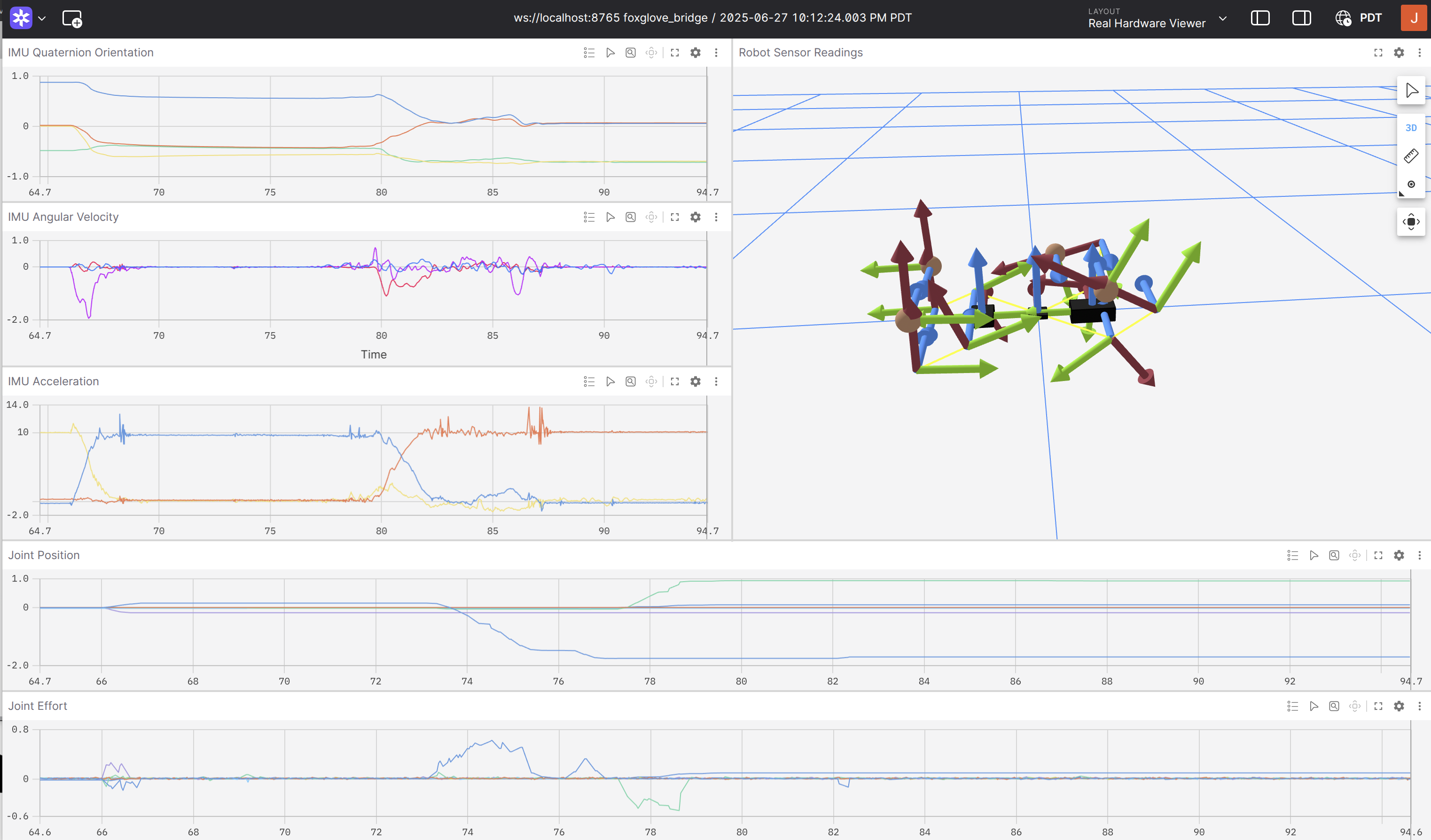
A digital twin of the quadruped may be observed in the upper right. The frame of the robot updates with the joint positions published from ROS through the joint state publisher. The joint positions and efforts are plotted in the lower half of the interface. IMU readings for orientation, angular velocity, and linear acceleration may be observed on the upper left side.
So as a high level overview check out this figure for the structure of ROS2.
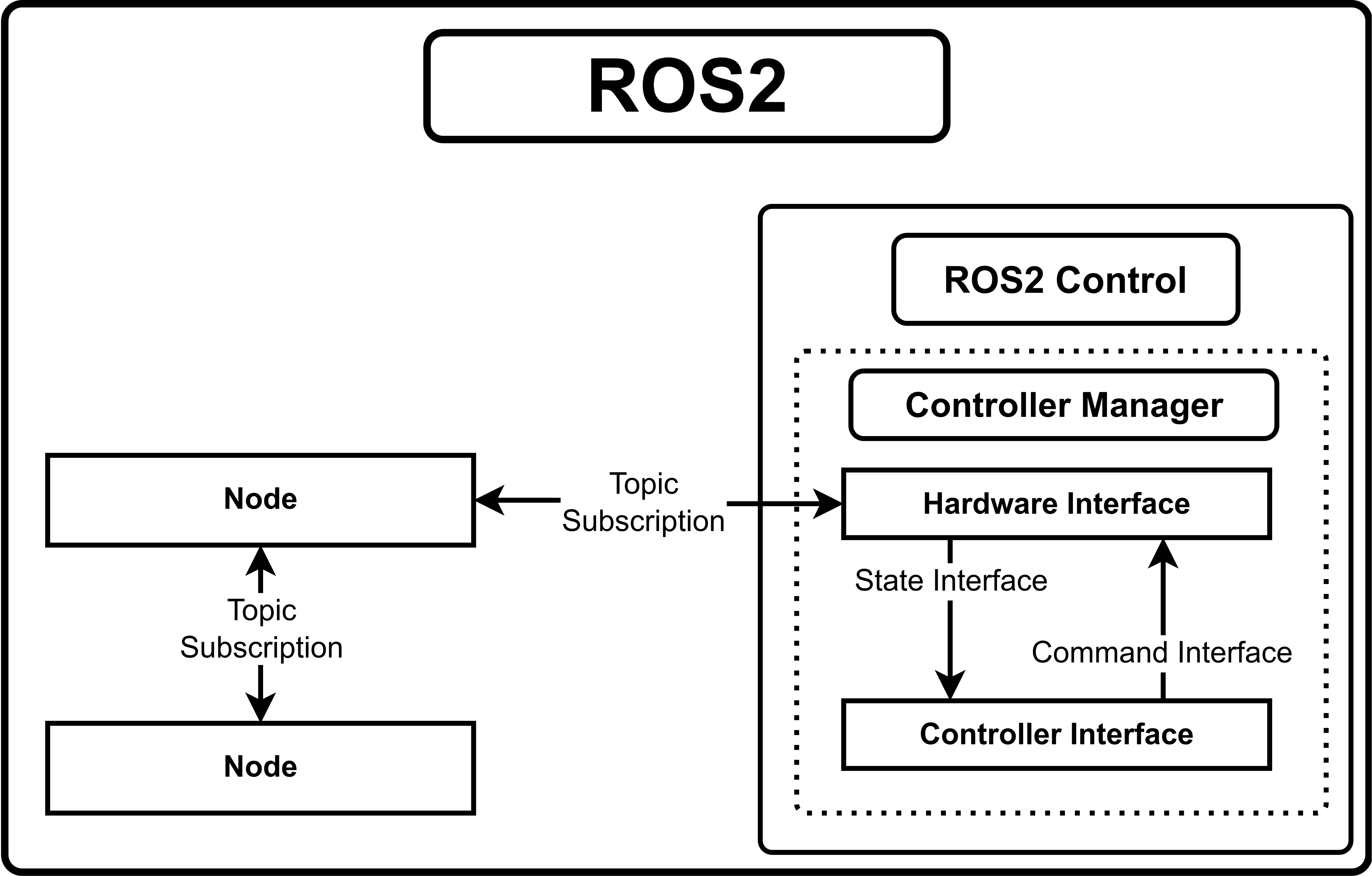
Programs or processes are encapsulated into nodes. They can communicate with one another using topics. One node can publish to a topic /data and a different node can subscribe to that topic and receive whatever is stored in /data.
ROS2 has some interesting characteristics. These nodes are running a bit randomly. They will run at around the right frequency, but they might be off. Additionally nodes written in python can be a bit slow, depending on what you are doing. ROS2 Control aims to solve these issues.
ROS2 Control
ROS2 Control is a sub-environment within ROS2 with it’s own rules. Programs written in ROS2 Control are exclusivity written in C/C++ and are called hardware interfaces and controller interfaces. These interfaces communicate via state and command interfaces. Generally speaking a hardware interface such as a motor will expose state interfaces for state information such as position, velocity, etc, and will expose command interfaces for data for commands which could be command position, torque, or PWM percent. For more information check out ROS2 Control !
Resources
Killer ROS2 Youtube Channel Robotics Back End Mike Likes Robots